
ReMynd keeps a journal for you.
It runs quietly on your Mac and writes each day down as a page in a book, so yesterday is somewhere you can go back to.
 ReMynd
ReMynd remembers what was on your screen and what was said on your calls, so the thing you half-remember is one question away.
It runs quietly on your Mac and writes each day down as a page in a book, so yesterday is somewhere you can go back to.
Docs, mail, code, your calendar, the call you were on. ReMynd records your screen, reads the text in every frame and transcribes your calls. Apps you exclude stay out.
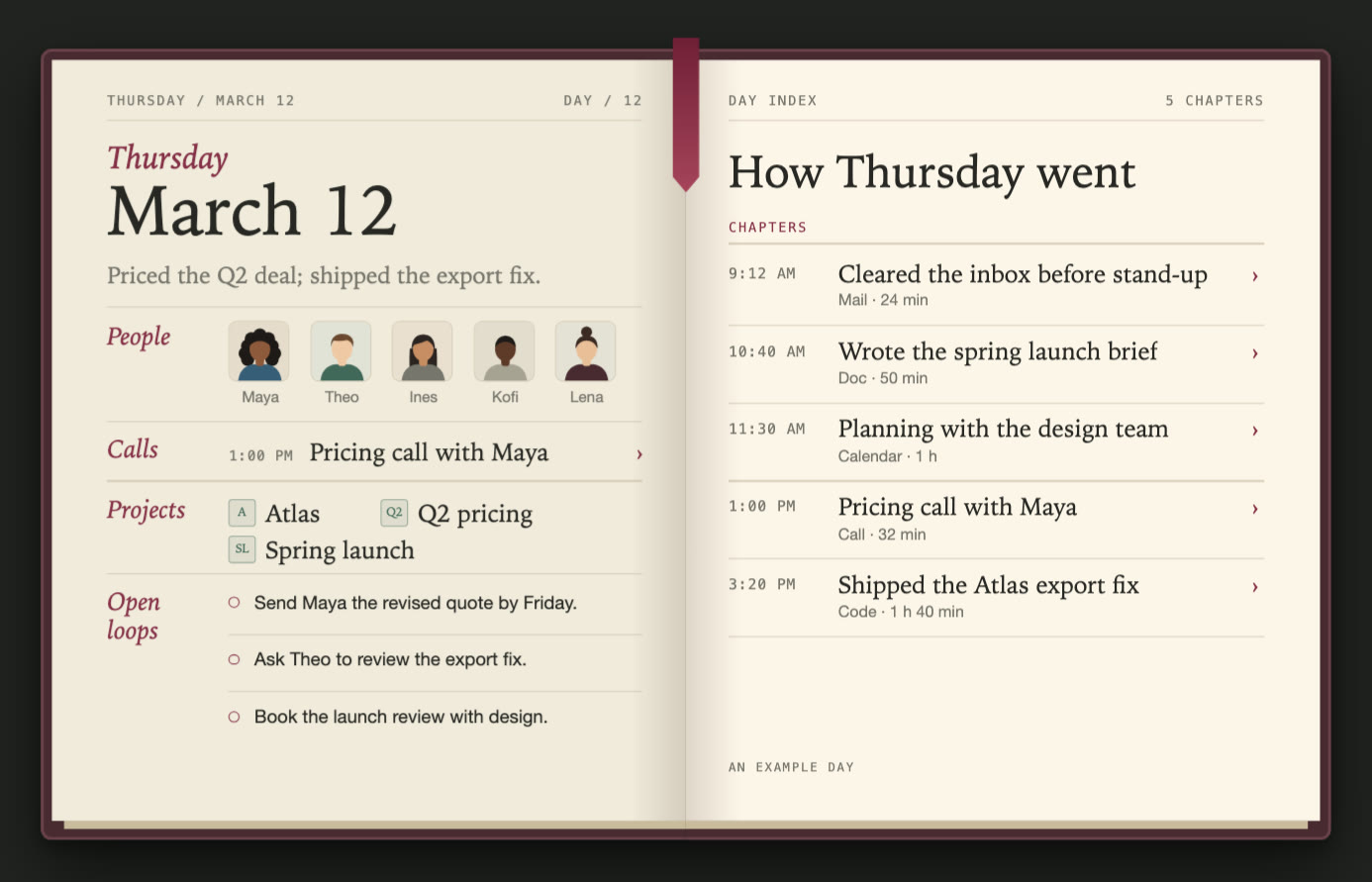
Each stretch of work becomes a chapter with its time. The people you talked to, the projects that came up and the things you still owe someone are pulled onto the page.
Every day adds a page, and the book is yours. Open anything on it:
On your Mac. Its pages are written into your user Library, next to your recordings, their text and your timeline. Backup, to a bucket you own, is opt-in.
Zero data retention. To write a page, ReMynd sends excerpts of the day, text from your screen and calls, to a model through ReMynd’s proxy. It goes only to providers that retain none of it and don’t train on it.
Names, not what was said. To find pictures of the people and companies in it, the journal looks up their names on the web, and nothing else from your screen or calls. Switch it off in Settings.
What you’ve already connected in Claude Code and Codex can flow in, and ReMynd goes out to the AI you already ask. Each way stays off until you switch it on.
In Early access
 Google Calendar
 Gmail
Gmail Slack
Slack Notion
 Google Drive
 GitHub
 Linear
 Figma
FigmaThrough  Claude Code and
  Codex
Codex
From Google Calendar
“Pricing call with Maya, 1:00 PM” goes on Thursday’s page, marked as from a connector.
Out Every download
ClaudeClaude CodeCodexChatGPTSettings → AI Integrations
In Claude
Asked in Claude: “What did I promise Maya?” ReMynd reads the pricing call with Maya and answers: “The revised Q2 quote, by Friday.”
Looking for a Rewind alternative? Rewind stopped recording in December 2025 and its apps were pulled. ReMynd is a private alternative for your Mac: your screen and your calls, recorded and searchable, kept in your own Library. See how it compares
Recordings, extracted text and your timeline live in your user Library. There is no upload path to us. Encrypted backup to a bucket you own is opt-in, and the credentials never leave your Mac. When you ask ReMynd’s built-in AI, the request only goes to zero-data-retention model providers: they don’t store it and never train on it.
On-device OCR makes everything you’ve read full-text searchable. Hit Control + Space to search or ask, then jump back to the exact frame it came from.
Zoom, Google Meet, Microsoft Teams and Slack Huddles are recorded and transcribed into the same timeline. Ask what someone committed to, and read the line back.
Apple silicon · macOS 14 or later · about a minute to set up
Today it’s a Mac app. The capture, the on-device OCR and the local index are all built on macOS frameworks. Leave your email, we’ll confirm you’re on the list, and the next thing you hear from us is that there’s a Windows build to install. Nothing in between.